Yoho Desktop App Board and iCollections both promise a tidier Mac desktop, and their names might even show up in the same search. But they are built around different ideas, and choosing between them is mostly a matter of deciding what you actually want sitting on your desktop.
A note on how this comparison was written: it is a documentation-based comparison, put together from each product's official descriptions rather than hands-on testing of both apps. It is also published by Yoho's developer, so the facts below are kept strictly to what each vendor documents, and the conclusion is about fit — not a scored winner.
The short answer: choose by what you want on your desktop
If you want a dedicated board for a small set of application shortcuts — arranged, renamed, and styled the way you like — that is Yoho's job. If you want to organize the desktop itself, grouping files, folders, and apps into collections, that is the job iCollections describes. Neither answer makes the other product worse; they simply scope the problem differently. Everything below follows from that one distinction.
What Yoho is designed to do
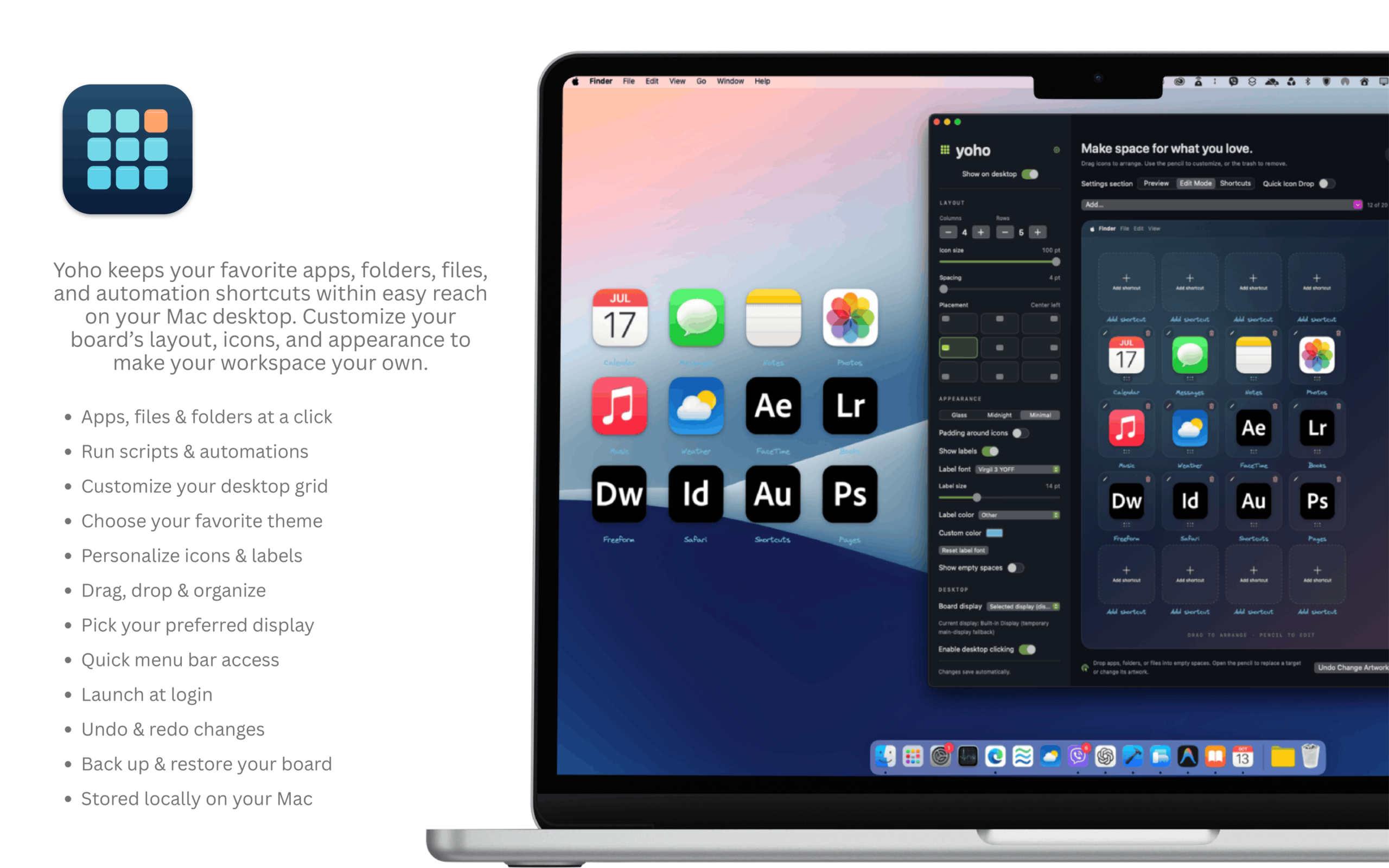
Yoho Desktop App Board is a native macOS utility that gives your everyday application shortcuts a customizable home on the desktop. You arrange your apps in a grid, personalize shortcut names and artwork, and choose the board's appearance and placement to suit your setup. The board sits beneath ordinary app windows and is managed from the menu bar.
The feature list is deliberately narrow. You can edit and reorder shortcuts as your routine changes, and undo a change you do not like. You can export a portable backup of your board configuration and restore it later — useful if you set up a new Mac or want to experiment safely. You can also choose whether the board responds to desktop clicks. Settings and artwork are stored locally on your Mac. In other words, Yoho does one thing — hold your chosen app shortcuts, in your style, on your desktop — and leaves your actual files and folders entirely alone.
Yoho is ¥800 as a one-time purchase on the Mac App Store, and version 1.0 requires macOS 15.8 or later.
What iCollections is designed to do
iCollections, from Naarak Studio, is a desktop organizer. In the vendor's description, its central idea is the Collection: an area on the desktop where you sort and arrange your icons so related items stay together — files such as pictures, documents, and screenshots, along with applications and folders.
The vendor documents a broad set of collection types and options. Collections can have tabs to group more items in one place; there are folder views for reaching into a chosen folder from the desktop, disk panels showing your drives, photo frames that display favorite images, a calendar view, and a web view that shows a favorite site. Collections can be resized, restyled, and customized with different fonts, colors, and item sizes, and the vendor says you can replace the icon of any file, folder, or application with your own picture. According to Naarak Studio, iCollections requires macOS 10.13 or later and is priced at $29.
In short, where Yoho's scope stops at app shortcuts, iCollections' scope is the whole desktop's contents.
Compare the decisions that matter
| Criterion | Yoho | iCollections |
|---|---|---|
| Documented emphasis | Personal application shortcut board | Broader desktop item organization |
| Visual personalization | Shortcut names, artwork, board appearance and placement | Collection styles, fonts, colors, and item presentation described by vendor |
| Files and folders | Not part of Yoho's job — it holds app shortcuts only | Vendor describes grouping files, folders, and apps in desktop collections |
| Price and OS requirements | ¥800 one-time on the Mac App Store; macOS 15.8 or later | $29 per vendor site; macOS 10.13 or later per vendor site |
A few honest notes on reading this table. The price and system requirements come from each product's public listing and vendor site, so check them again before buying, since they can change. And because this comparison is documentation-based, it does not claim either app is quicker to set up or nicer to use day to day — those judgments need hands-on testing, and your own habits matter more anyway.

Three everyday scenarios
A writer who wants six familiar apps. Every morning she opens the same browser, notes app, writing tool, calendar, music app, and dictionary. She does not keep files on her desktop at all. For her, the question is only "where do my six apps live, and can they look nice?" That is squarely Yoho's job — a small board, personalized once, done.
A student grouping documents and app icons. His desktop holds course PDFs, screenshots, a shared folder, and a handful of apps, all mixed together. His problem is not launching apps; it is that everything lands in one pile. Grouping those mixed items into labeled collections is the job iCollections describes, and a shortcuts-only board would not address it.
Someone who prefers an empty desktop. She launches everything with search and wants nothing visible at all. Neither product is really for her — and that is fine. The built-in tools below may be all she ever needs.
Can the built-in Dock or Stacks be enough?
Quite possibly. The Dock is free, already installed, and perfectly good for a row of favorite apps; if you do not mind its fixed look and position, you may not need Yoho. Stacks, also built in, automatically groups loose desktop files into piles by kind; if file clutter is your only issue, you may not need iCollections either. It is always worth trying the free options first and seeing which specific frustration remains. (Our calm desktop guide walks through that tidy-up step by step.)
Which should you choose?
Choose Yoho if your desktop goal is a small, personal home for the apps you open every day — visible, clickable, and styled by you — and your files are already handled elsewhere. Choose iCollections if your goal is to organize the desktop's contents themselves, grouping files, folders, and apps into collections. And choose neither if the Dock and Stacks already leave you nothing to complain about; the best desktop tool is the one whose job you actually have.
FAQ
Is Yoho a file organizer?
No. Yoho holds shortcuts to your applications. It does not sort, move, or manage your files and folders — that is a different job, handled by tools like Stacks, the Finder, or iCollections.
Do I need to replace my Dock?
No. Plenty of people keep the Dock for running apps and use a board for their chosen shortcuts. Yoho sits on the desktop layer; it does not remove or replace anything built into macOS.
Which is better for someone who wants only application shortcuts?
That narrower job is the one Yoho is designed around: a grid of app shortcuts with your own names, artwork, and placement. iCollections can include apps inside its collections, but its documented scope is broader, covering files and folders too.
Prefer a dedicated place for your everyday apps? Explore Yoho on the Mac App Store.